My Drafts
The My Drafts page collects every draft -- blog posts and pages -- for the currently selected site into a single list, so you can pick up unfinished work without hunting through the separate Blogs and Pages listings.
Accessing My Drafts
Click My Drafts in the sidebar. The link is always visible. Like most pages, it is scoped to the currently selected site; switch sites to see that site's drafts.
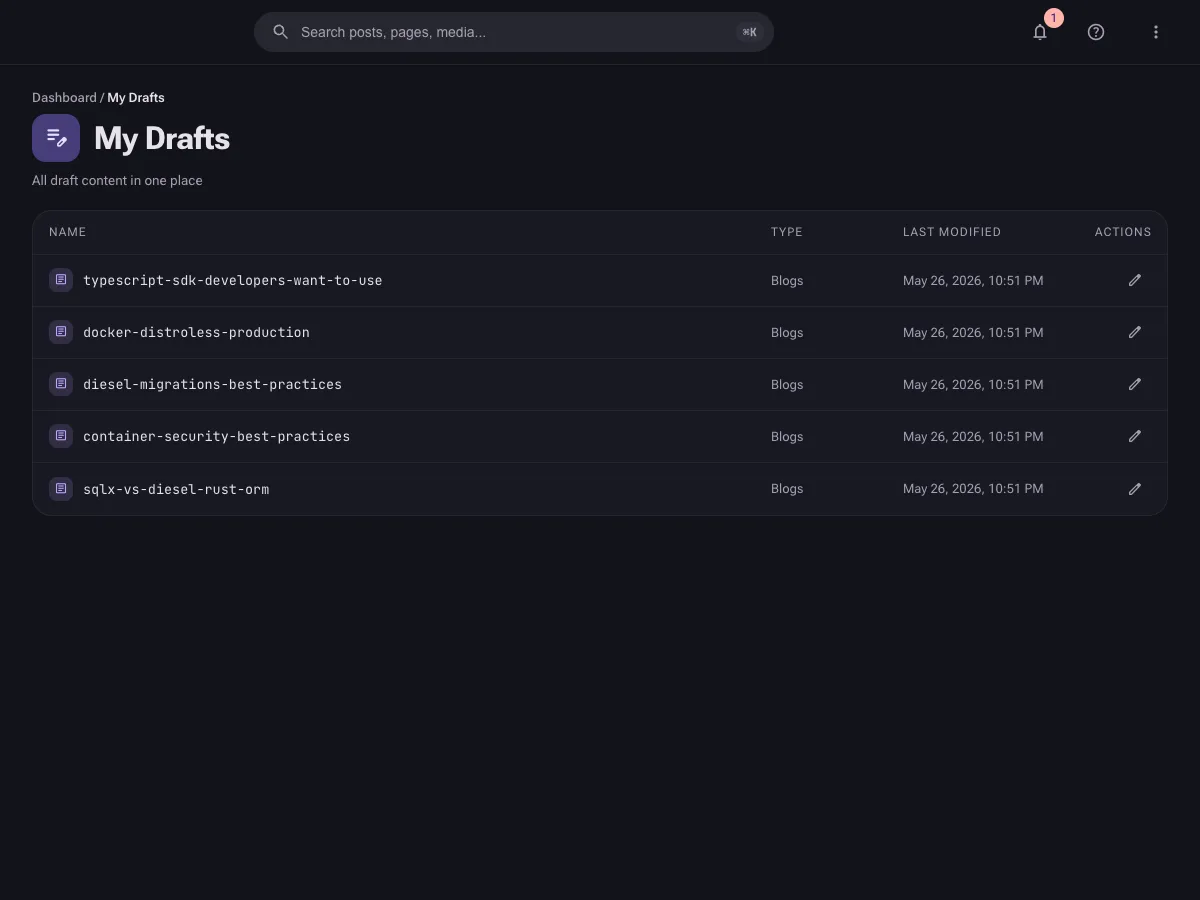
What Is Shown
My Drafts lists content that meets both of these criteria:
- Status is Draft -- published, scheduled, in-review, and archived items do not appear here.
- Belongs to the selected site -- drafts are not aggregated across multiple sites.
Both blog posts and pages are included, sorted with the most recently modified first.
Draft List
Each entry displays:
| Column | Description |
|---|---|
| Name | The item's slug (blog) or route (page); shows Untitled if not yet set. |
| Type | Whether the item is a Blogs or Pages item. |
| Last Modified | When the draft was last edited, shown as an absolute date and time. |
| Actions | A pencil icon that opens the draft in its editor. |
Editing a Draft
Click the edit icon (or the row) to open the draft in the corresponding editor -- the blog editor or the page editor. From there you can keep saving as a draft or publish.
Tips
Use My Drafts as your daily starting point for the site you are working in -- it surfaces everything still in progress without filtering the full Blogs and Pages lists yourself.
- If you expect a draft that is not listed, confirm you have the correct site selected -- the list is per-site.
- Published, scheduled, in-review, and archived content does not appear here. Use the Blogs or Pages listing to find those.